Introduction
Academic libraries serving large,
research-oriented institutions utilize various online tools to address their
users’ information needs. One notable resource primarily associated with such
libraries is research guides, which are specialized online pages featuring
curated resources and advice for starting the research process.
Auburn University is an R1 land-grant university located in eastern
Alabama, with an approximate enrollment of 34,000 students, the majority of
whom are undergraduates. The Auburn University Libraries (AUL), a member of the
Association of Research Libraries (ARL), has been developing and maintaining
research guides for all users, particularly undergraduate courses, and
promoting these resources in classroom instruction since the late 1990s. In
those early days of the Internet, like many libraries at that time, AUL
utilized a homegrown system to develop and manage subject guides. In 2010, AUL
transitioned to the Springshare product LibGuides—a decision they have fully embraced ever since.
In 2018, with funding from the Office of the
Provost, Auburn University was designated as an Adobe Creative Campus,
providing students with free access to the Adobe Creative Cloud, along with
discounted subscriptions for faculty and staff (Hooper & Lasley, 2022;
Office of Communication and Marketing, 2018). Units across campus began to
integrate Adobe products into assignments and internal workflows, although
Adobe Express is not maintained centrally by the library, and so the full count
of guides created within it is unknown. Beginning in 2019, AUL initiated
workshops focused on Adobe products and began actively promoting various Adobe
classroom tools, including Adobe Express, to course instructors as a resource
for course webpages and assignments (Hill, 2022). Adobe Express is a
user-friendly, cloud-based tool for generating digital content such as
websites. Following 2020, having received training in Adobe products and
prompted by this widespread use, newly hired librarians at Auburn University
were inspired to try out this new tool for an essential library asset: the research
guide.
LibGuides, a library-specific software, facilitates
seamless access to library resources and collections. However, students’
familiarity with Adobe Express might lead to better ease of use because they do
not also have to learn the tool itself. Design options and best practices
differ between the two systems. Given these differences, the current project
seeks to compare students’ navigation of research guides created in LibGuides and Adobe Express through a usability study.
Literature Review
Adobe Express
History and Evolution
Adobe Express is not a library-specific software; it’s one of many
tools produced by the parent company Adobe. Formally launched in 2021, Adobe
Express is an updated version of their earlier Web-based creation tool called
Adobe Spark, offering pre-built templates and user-friendly customization
options for creating digital content such as flyers, slide decks, photos and
videos, infographics, and webpages (Sharma, 2021). Webpages are created and
hosted within the Adobe Express platform, formatted as single pages but can
include anchor links to help users navigate, and limited in their ability to
integrate multimedia content and external embedded content (Adobe, 2025).
Though its tools are not exclusive to libraries or universities, Adobe does
actively pursue higher education partnerships, positioning itself as an ally in
the advancement of digital literacy skills (Adobe, 2020), and Auburn
University’s own partnership is an expression of this goal (Bohmholdt, 2023;
McCavitt, 2020). Because libraries do not currently widely use Adobe Express
for research guide creation, there is a gap in the literature on this
platform’s potential use in research guide design. The majority of recent
literature focuses on LibGuides, therefore so does
this literature review; however, many of the themes related to student
preferences in navigation and user behaviour could be applied to Adobe Express
webpages as well.
LibGuides History and Evolution
LibGuides originated from pathfinder-style research
guides that were print, static, and served primarily as curated lists of
suggested resources, differing from standard bibliographies in their purpose
and scope (Stevens et al., 1973). From the 1990s onwards, guides moved online
and shifted toward new Web-based features such as databases, graphics, and
tagging—even as the time and training required to work in these new
technologies increased (Morris & Bosque, 2010; Smith, 2008; Vileno, 2007). Utilizing Web 2.0 capabilities, library
technology company Springshare launched its LibGuides product in 2007, offering a streamlined,
easy-to-use tool for online guide creation (Emanuel, 2013). The LibGuides platform allowed librarians to create content
online without advanced HTML skills, embed images and widgets, and integrate
guides with the broader library Web presence. LibGuides
2.0, launched in 2014, expanded these toolsets and added features like search
boxes, templates, widgets, and a new vertical rather than horizontal placement
of subpage tabs (Chan et al., 2019; Coombs, 2015). Today, LibGuides
is the predominant platform academic libraries use to create online research
guides (Hennesy & Adams, 2021; Neuhaus et al., 2021). According to Springshare, the platform hosts over 950,000 guides across
5,748 institutions (Springshare, n.d.).
Pedagogical
Approach
LibGuides can be a rich resource for both in-class and
out-of-class learning. Integrating pedagogical principles into the design of LibGuides aligns with the educational goals of the
learners, including the incorporation of learning outcomes, lesson plans, the
use of the ADDIE model, collaboration with faculty, assignment mapping, and
differentiated instruction (Bergstrom-Lynch, 2019; Gonzalez & Westbrock,
2010; Lee & Lowe, 2018; Reeb & Gibbons, 2004). Cognitive
load theory emphasizes the need for user-friendly resources that reduce
cognitive load to enhance student engagement (Pickens, 2017). German et al.
(2017) recommended
using precise language, breaking content into manageable
segments (Little, 2010) and avoiding lengthy lists. Students
have responded more positively to tutorial-style over pathfinder-style guides,
indicating that a well-structured learning tool can increase student engagement
and efficacy (Baker, 2014; Hicks et al., 2022; Stone et al., 2018). Comparative studies, such as those by Kerrigan
(2016) and Bowen (2014), have shown that both LibGuides
and traditional webpages can effectively deliver online information literacy
content. However, it is essential to critically assess all guides. While some
researchers, such as Grays et al. (2008), relied on indirect methods like focus
groups to evaluate guide effectiveness, more recent research by Stone et al.
(2018) employed a direct measure of students’ graded annotated
bibliographies.
Mental Models
In the 1990s and
early 2000s, information and library science professionals seeking an
understanding of users’ search behaviours with the advent of webpages and
discovery layers began using the term “mental model” in usability studies
(Newton & Silberger, 2007; Swanson & Green, 2011; Turner &
Belanger, 1996), referring to the conceptual frameworks individuals create to
engage with their environment, interact with others, or use technology (Michell
& Dewdney, 1998). Librarians typically organize library guides based on their own
research process and academic disciplines, while students are more inclined to
focus on courses, coursework, and the tangible outcomes of research
(Castro-Gessner et al., 2015; Sinkinson et al., 2012; Veldof
& Beavers, 2001). Furthermore, creators should consider the specific mental
models of different generations (Blocksidge & Primeau, 2023; Matas, 2023).
For instance, individuals in Generation Z, who were born from 1995 through 2010
(Pew Research Center, 2019) and have a born-digital approach to
information-seeking, primarily seek to address specific information needs (Salubi et al., 2018) and exhibit Google-like search
behaviours: preferring to use search boxes, staying on the first couple of
pages of results, and skimming text rather than reading thoroughly (Blocksidge
& Primeau, 2023; Seemiller & Grace, 2017). Many Generation Z
respondents felt overwhelmed during their searches, often continuing to search
even after finding relevant sources, perceiving their struggles as a personal
failure rather than a flaw in the information structure (Blocksidge &
Primeau, 2023).
Student Use and
Impact on Students
LibGuides has recently been scrutinized for its
effectiveness in addressing these student needs. Research has indicated a
disconnect between LibGuides production and student
usage, highlighting a lack of student awareness and the need for improved
visibility regarding LibGuides (Bausman
& Ward, 2015; Carey et al., 2020; Ouellette, 2011; Quintel, 2016). Although
responses to LibGuides’ perceived utility are mixed
(Dalton & Pan, 2014), many students have expressed the willingness to use
guides again. Additionally, when LibGuides were
embedded in the learning management system (LMS), and students were aware of
them, they found them useful (Murphy & Black, 2013). Ultimately, while LibGuides hold potential, enhancing their design and
increasing awareness is crucial for improving their usability and
effectiveness.
Best Practices
A major portion of research on LibGuides has focused on formatting guides to increase
users’ ease of navigation and rates of use. Guides are customizable, allowing
librarians to create multi-page guides accessed through tabs either to the top
or left-hand side of the page (frequently called side navigation, side nav, or
vertical navigation). Research slightly favors side nav (Bergstrom-Lynch, 2019;
Duncan et al., 2015; Fazelian & Vetter, 2016; Goodsett et al., 2020). Some researchers found that not all
participants noticed the tab navigation toolbar when it was placed at the top
(Pittsley & Memmott, 2012; Thorngate & Hoden, 2017), demonstrating “banner blindness” (Benway,
1998). However, others found that user preference and effective use may be more
split (Chan et al., 2019; Conerton & Goldenstein, 2017; Conrad &
Stevens, 2019).
Research is more consistent on tab number:
generally, fewer is better, and the most important content should go under the
first tab (Castro-Gessner et al., 2015; Goodsett et
al., 2020; Quintel, 2016). Overuse of subtabs, located in drop-down menus
underneath main tabs, may also be an issue (Conrad & Stevens, 2019). In
practice, however, many universities do not follow this guidance–Hennesy and
Adams (2021) found a mean of 8.4 tabs per guide at R1 universities, exceeding
Bergstrom-Lynch’s (2019) recommended six.
LibGuides also allows authors to choose whether content
appears in one, two, or three columns. Findings here are likewise split, with Thorngate and Hoden (2017)
finding a slight edge for the two-column design. Conrad and Stevens (2019)
found similar success rates across column layouts but noted that their
participants gravitated toward searching instead of browsing, which may have
affected their interactions. Conrad and Stevens are not alone in this finding,
though they and others report student confusion about what exactly integrated LibGuides search boxes are searching (Conerton &
Goldenstein, 2017; Conrad & Stevens, 2019; Goodsett
et al., 2020).
Simplicity and ease of use is a repeated theme
in LibGuides design. Having a clean look, minimal
visual clutter, and appropriate whitespace is important for users to not feel
overwhelmed by guides’ content (Baker, 2014; Hintz et al., 2010; Ouellette,
2011; Sonsteby & DeJonghe, 2013). Several researchers indicated a clear
user preference for designs that reduce text-heavy pages and that minimize the
need to scroll (Barker & Hoffman, 2021; Conerton & Goldenstein, 2017;
Hintz et al., 2010), though some researchers found that text-heavy pages were
not as detrimental if they were well-organized (Cobus-Kuo et al., 2013; Ray,
2025). Likewise, research on the benefits of including multimedia or
interactive content in guides is split, with Wan (2021) finding they increase
engagement and other studies more ambivalent (Cobus-Kuo et al., 2013).
Other LibGuides best practices emphasize
reducing library-specific jargon, pointing to student confusion around labeling
of basic research terminology in LibGuides
(Bergstrom-Lynch, 2019; Conerton & Goldenstein,
2017; Sonsteby & DeJonghe, 2013), as well as broader library resources
(O’Neill, 2021). Little (2010) tied this to cognitive load theory, arguing that
unfamiliar terminology takes up valuable space in students’ learning capacity.
Consistency across an institution’s guides is also key: standardizing guides in
color, template, and organization surfaces as a recommendation in several
studies (Bergstrom-Lynch, 2019; Burchfield & Possinger, 2023).
Problems in Design
and Implementation
However, these guidelines and practices are at best unevenly applied.
Maintaining LibGuides requires consistent workflows
and regular updates, placing a demand on librarian time. Logan and Spence
(2021) found most academic libraries leave oversight and updates up to
creators, and 47% of surveyed institutions do not have standardized content
creation guidelines, leading to inconsistencies. This is echoed in the
literature: despite several researchers advocating for cohesive formatting
templates within institutions (Almeida & Tidal, 2017; Bergstrom-Lynch,
2019; Burchfield & Possinger, 2023) and the recognition that students
desire a seamless experience (Cobus-Kuo et al., 2013), most libraries do not
enforce uniformity or regular review of guides. Even when desired, these
standards can be difficult to implement (Chen et al., 2023; Del Bosque &
Morris, 2021; Gardner et al., 2021; Jackson & Stacy-Bates, 2016). None of
these are new issues (Vileno, 2007), but creating and maintaining guides that promote
student learning remains a time-consuming process.
Assessment of Research Guides
German et al. (2017) emphasized that
assessment is the most frequently discussed aspect within the literature on LibGuides, urging creators of library guides to contemplate
the tools and methods they will employ for evaluating their LibGuides.
Usability testing is well-documented as a useful method to better understand
user experiences with LibGuides (Almeida & Tidal,
2017; Baird & Soares, 2018; Castro-Gessner et al., 2015; Chan et al., 2019;
Conerton & Goldenstein,
2017; Goodsett, 2020; Hintz et al., 2010; Thorngate & Hoden, 2017). In
addition to usability testing, there are numerous options available for
assessment, including focus groups, feedback surveys, student assignment
analysis, and page view counts. While Springshare
provides integrated data on guide and page views, Griffin and Taylor (2018)
utilized Google Analytics to offer a more comprehensive understanding of user
patterns and pathways that directed users to their LibGuides.
Assessment should be a continual process, with user perspectives sought during
both design and implementation phases. Castro-Gessner et al. (2015) observed
that librarians often neglect to solicit feedback from end-users regarding
guides post-implementation. DeFrain et al. (2025) further highlighted the
shortcomings in learning assessment in a recent scoping review that examined
guides’ effectiveness in fostering students’ information literacy skills,
shifting the emphasis in assessment from the product to its impact. To improve
assessment workflows and learning outcomes, Smith et al. (2023) developed a
rubric for evaluating authors’ guides, which Moukhliss
and McCowan (2024) later expanded on by proposing internal peer review
standards and proposing a design and assessment rubric called the Library Guide
Assessment Standards (LGAS).
Aims
The
aims of this study were to evaluate the usability of research guides created
with LibGuides and Adobe Express. We sought to
compare student navigation and perceptions of both platforms, using the same
content. LibGuides merits study as a library-focused
platform extensively used in academic libraries, including the researchers’
home institution, especially around whether its features offer advantages for
student engagement. However, other platforms may offer viable alternatives for
research guide creation. Given the recent use of Adobe Express at the
researchers’ university, within the context of its status as an Adobe Creative
Campus, evaluating this option for research guides had the potential to enhance
student support. Researchers aimed to determine if familiar technology, which
students may also encounter outside the library context, might better serve the
purpose of linking students to resources and providing basic research guidance.
With
the goal of reflecting and assessing real-world use, the study sought to
compare research guides mirroring those used for classes at AUL. At AUL,
internal guidelines for LibGuides design stipulate
the use of a side-navigation, multi-page design, whereas Adobe Express pages
exclusively offer a single-page layout. Thus, in the present study, we compared
the layouts most often used for class guides within each platform. Comparing
these two options allowed researchers to assess whether our institution should
retain its current practice, or whether a shift to an alternative platform
would be viable.
·
RQ1: What issues in navigation do novice
researchers encounter when using research guides created in the LibGuides platform?
·
RQ2: What issues in navigation do novice
researchers encounter when using research guides created in Adobe Express
webpages?
·
RQ3: Are there features users identify in
research guides created in either LibGuides or Adobe
Express webpages that help or hinder their discovery of and interaction with
library resources?
Since
librarians are not the primary users of these guides, understanding student
perspectives is crucial for assessing their effectiveness in supporting
research. By elucidating pain points for users under each option, in the
layouts typically used in real-world practice at the researchers’ home
institution, the goal of the study was to identify strengths and weaknesses of
each platform, in order to help influence decision-making for librarians
designing resource guides.
Methods
Usability Testing
To answer these questions, the researchers conducted usability tests
on research guides created in both LibGuides and
Adobe Express. The usability testing methodology, wherein a small group of
users is assigned a set of specific tasks to complete using a platform,
identifies system issues and design problems (Nielsen, 2012a). During usability
tests, participants are asked to navigate the system naturally, as if
unobserved, and to follow a “think-aloud” protocol, where they describe their
thoughts and actions out loud (Moran, 2019). A researcher is present to read
from a prepared script outlining the study’s steps and to facilitate the
session, with another researcher present for notetaking, positioned behind
participants to maintain a clear view of the screen. The facilitator’s role is
intentionally non-intrusive, primarily prompting participants to vocalize their
thoughts without providing direct guidance, thereby allowing for an authentic
representation of their user experience (Moran, 2019). Screen-recording
software captures the on-screen navigation and audio commentary for later
analysis.
The goal of usability testing is not to
highlight user error or skill deficits. Quantitative usability tests utilize up
to 30 users to draw statistical inferences. On the other hand, qualitative
usability tests are meant to identify overlapping themes of problematic
features in platform design, not exhaustively pinpoint every potential issue
(Nielsen, 2012a). Consistent with their less formal design and their use of the
“think aloud” method, qualitative usability studies often have more “noise” or
interactions between facilitators and participants, which do not invalidate the
studies’ findings, but which make them more useful for thematic insights than
statistical significance (Budiu, 2017; Nielsen & Budiu, 2001).
In standard qualitative usability tests, a
small group of five test participants is generally enough to discover most
major shared design issues (Nielsen, 2012b). The current study sought five to
eight participants to test each platform, providing a cushion for no-shows or
technical issues. We used a between-subjects design, where each test group
interacted with only one platform, to minimize the influence of one system on
participants’ assessments of the other (Budiu, 2023).
Recruitment and
Incentives
Participants were required to be current
undergraduate students at Auburn University and to commit 30 to 45 minutes of
their time. Researchers distributed flyers near a busy classroom building early
in the semester, offering a $25 gift card to encourage participation, which
participants would receive electronically at the start of the study. Interested
individuals could register via a Qualtrics form and would then receive
instructions from the principal investigator on how to schedule an appointment.
Twelve students were ultimately recruited for participation, with six students
observed for each test guide.
Research
Instruments
Sessions were held in a consultation room in
the library during Fall 2023 and Spring 2024. At each session’s outset,
participants were read a script, after which the screen recording software,
Panopto, was initiated. Before receiving the tasks, participants were asked to
complete a pretest questionnaire, administered online through Qualtrics (see
Appendix A for the pretest survey). The pretest also collected information
about class rank, major, and demographics.
A laptop was designated for study
participants, with Panopto capturing participants’ on-screen movements, audio,
and facial expressions. The sessions were conducted using two test guides
created in LibGuides and Adobe Express, with content
as closely aligned as both systems allowed. The guides modeled a
typical freshman-level English Composition course at Auburn University, in
which information literacy is a key student learning outcome and library
instruction is routinely integrated
(Auburn University, 2024). Instruction in these courses is focused on
evaluating Web sources, finding reputable sources online and at the library,
and managing research projects.
The test LibGuide (aub.ie/usability_test_guide) (see Figure 1) complies with key best
practices, including side nav (Bergstrom-Lynch, 2019; Fazelian
& Vetter, 2016; Goodsett, 2020), two-column
layout (Thorngate & Hoden,
2017), five tabs (Bergstrom-Lynch, 2019), profile boxes on every page (Almeida
& Tidal, 2017; Bergstrom-Lynch, 2019; Ray, 2025), a search box (Conrad
& Stevens, 2019), and minimal scrolling required (Barker & Hoffman,
2021; Conerton & Goldenstein, 2017; Hintz et al., 2010). Moreover, it
employs a multi-page design, reflecting current practice for class guides at
the researchers’ home institution. Although it is possible to create
single-page LibGuides without any tabs, design
guidelines at AUL call for multi-tabbed designs to minimize scrolling. To
compare potential adoption of Adobe Express guides to current use, researchers
designed the test guide following these internal best practices, complying with
recommendations in the literature to follow institutional standards when
designing guides (Bergstrom-Lynch, 2019; Del Bosque & Morris, 2021).
The guide starts with a “Welcome” page
introducing its purpose. The next page, “Evaluating Sources,” includes resources
for fact checking, criteria for evaluating Web sources, and a section about
website domains. The third tab, “Finding Reliable Sources,” includes a list of
four recommended databases and an embedded library catalogue search. The
“Research Tips” tab includes suggestions for organization, a tabbed box
covering academic integrity, and a link to Zotero for citation management.
Finally, the “Get Help” tab has an embedded LibAnswers
FAQ search and a link to the “Subject Librarians” page on the library website.
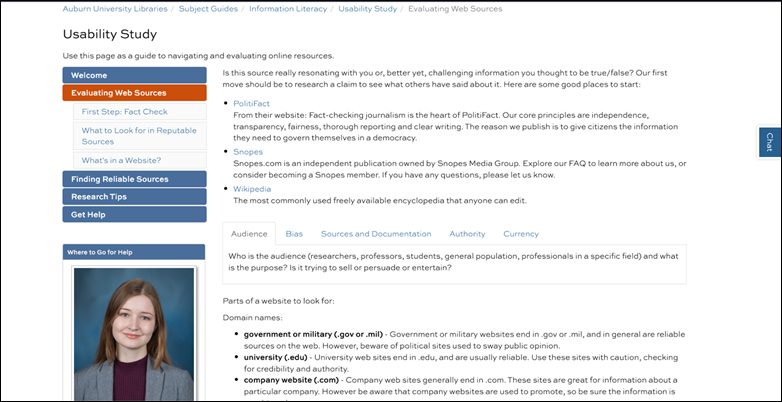
Figure 1
Screenshot of the “Evaluating Web Sources” tab
on the test LibGuide.
The Adobe Express test page (aub.ie/usability_test_page) (see Figure 2) contains the same content.
However, because Adobe Express lacks LibGuides’
embedding and integration features, minor adjustments were necessary. Most
significantly, Adobe Express webpages do not allow tabbed designs directly
mirroring the LibGuide, but rather everything appears
on a single page, making navigation scroll-focused.
The guide starts with the same welcome introduction and then uses anchor links
to allow users to jump ahead in the text. The section order remains the same:
“Evaluating Web Sources,” “Finding Reliable Sources,” “Research Tips,” and “Get
Help.” Instead of an embedded catalogue search and LibAnswers
FAQs, the guide includes links. The database descriptions are written out in full-text instead of pop-up text that appears when
hovered over. Content in tabbed boxes is visible simultaneously. Finally,
instead of profile boxes, librarian photos and contact information appear at
the end of the page.
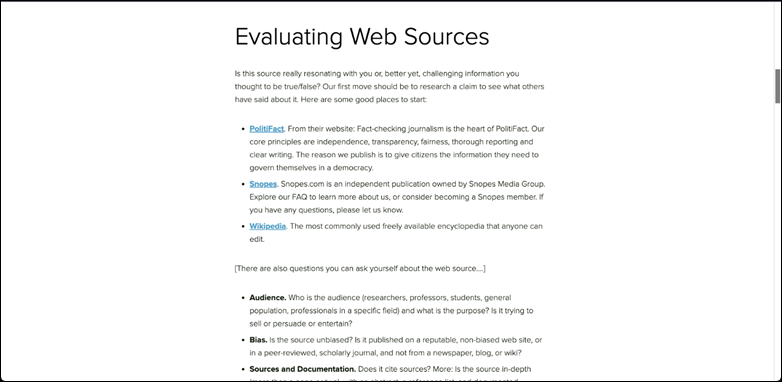
Figure 2
Screenshot of the “Evaluating Web Sources”
section of the test Adobe Express page.
Researchers designed six tasks reflecting a
range of real-world actions students might use research guides to accomplish.
Tasks were identical for the two user groups, and all users completed all six
tasks. Following best practices of usability testing design, the tasks were
short, actionable, and avoided leading users with specific language or
instructions within the prompts (McCloskey, 2014). (See Appendix B).
After completing tasks, participants completed
a posttest questionnaire gathering their impressions
of the platforms, administered through Qualtrics (see Appendix C). They were
not asked to follow the think-aloud protocol during this portion of the session
because they were providing written responses. Finally, after the posttest survey, the facilitator asked the user for general
feedback and answered any questions.
Data Processing
Upon session completion, researchers used
Panopto to transcribe the recordings and subsequently refined these
transcripts, incorporating details of the on-screen actions. Next, researchers
began to identify themes in participants’ actions and comments, leading each
researcher to establish an initial code tree. The researchers convened to reach
consensus on the initial codes. With this agreement in place, a comprehensive
code tree was created in NVivo, a qualitative data analysis software. The
transcripts were then imported into NVivo and coded to identify patterns within
the data.
Results
Pre and Posttest Surveys
The results of the pretest (Figure 3)
confirmed that both test groups fit the target population of novice
researchers. The Adobe Express group skewed slightly older than the LibGuides group, with an average of 2.5 versus 2 years at
the university. Only one student recalled using a research guide for a class.
The majority reported themselves as somewhat confident in their online search
skills (five out of six for the LibGuides group, and
four out of six for the Adobe Express group).
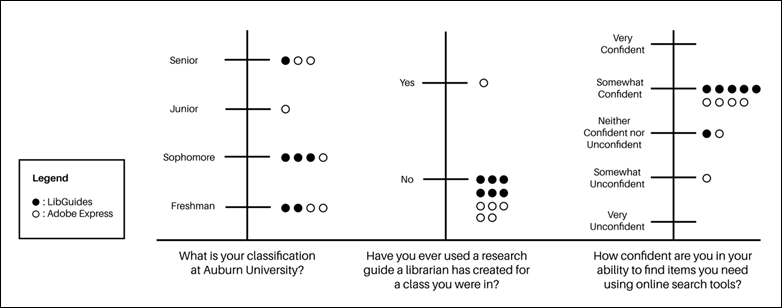
Figure 3
Pretest questionnaire results.
The posttest
responses detailed in Figure 4 likewise showed only minor differences between
the two populations’ experiences. Both sets of responses were fairly positive
about the guides’ ease of use, with half of LibGuides
users finding it easy and half neutral, while Adobe Express users ranged
between very easy, easy, and neutral. The two groups averaged out at the same
reported confidence in their future ability to use research guides to find
library resources in a class, with more spread among the Adobe Express group. A
similar pattern repeated with confidence in future ability to find helpful
information using research guides. Finally, when asked about their confidence
in using research guides to get help from the library, LibGuides
participants skewed very slightly higher.
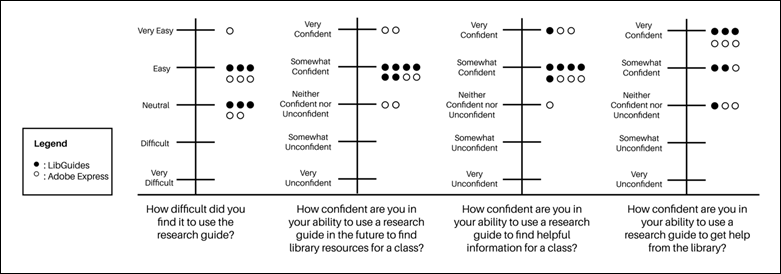
Figure 4
Posttest questionnaire results.
Overall, Adobe Express participants’ responses
were spread between answer choices more than LibGuides
participants’ (covering three response options in all questions), and ranged
marginally higher in two questions, though lower in one. However, given the
qualitative nature of this study, statistical significance should not be read
into these data.
Task Success
Fewer participants than expected successfully
completed all tasks. As Figure 5 indicates, Adobe Express users had overall
higher success rates, at 23 out of 36 successful tasks versus 17 for LibGuides, with half of the Adobe Express participants
completing 5 out of the 6 tasks correctly and through the intended pathways.
Moreover, there was more variation in potential task outcomes than researchers
expected (see Table 1). Only around two-thirds of total tasks resulted in a
clear success or failure, with a third left as inconclusive or partially
successful attempts. Some users approached tasks in unexpected
ways, differing from those that the researchers assumed or that the guides most
directly enabled. Many students
thought they solved tasks, when in fact they had failed—for
instance, finding a different format of source than the task required, without
realizing the mistake, or searching for data within an article rather than
locating a database as requested. LibGuides users
experienced more of these instances of confusion, at eight task attempts.
Overall, neither guide fully empowered participants to complete all tasks
without barriers, but Adobe Express seemed to enable slightly greater success
and less confusion.
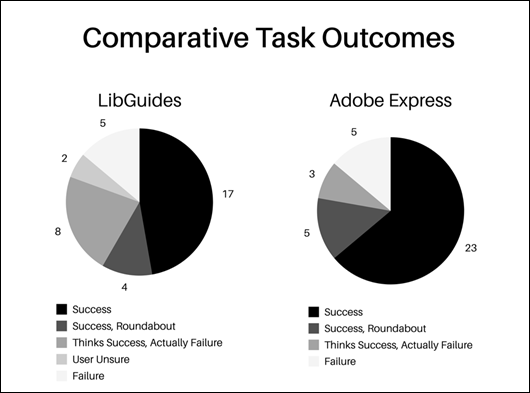
Figure 5
Comparative task outcomes.
Table 1
Task Completion Outcomes by Taska
|
Session
|
Task 1
|
Task 2
|
Task 3
|
Task 4
|
Task 5
|
Task 6
|
|
LG1
|
Thinks Success
|
Success
|
Failure
|
Success
|
Failure
|
Thinks Success
|
|
LG2
|
Failure
|
User Unsure
|
User Unsure
|
Success
|
Thinks Success
|
Success
|
|
LG3
|
Roundabout
|
Success
|
Success
|
Roundabout
|
Success
|
Success
|
|
LG4
|
Thinks Success
|
Thinks Success
|
Roundabout
|
Success
|
Success
|
Thinks Success
|
|
LG5
|
Success
|
Success
|
Failure
|
Success
|
Thinks Success
|
Success
|
|
LG6
|
Thinks Success
|
Success
|
Roundabout
|
Success
|
Thinks Success
|
Success
|
|
AE1
|
Success
|
Failure
|
Success
|
Success
|
Success
|
Success
|
|
AE2
|
Success
|
Success
|
Success
|
Success
|
Success
|
Roundabout
|
|
AE3
|
Success
|
Failure
|
Success
|
Success
|
Success
|
Success
|
|
AE4
|
Failure
|
Failure
|
Success
|
Thinks Success
|
Failure
|
Roundabout
|
|
AE5
|
Success
|
Thinks Success
|
Success
|
Roundabout
|
Success
|
Success
|
|
AE6
|
Success
|
Thinks Success
|
Roundabout
|
Success
|
Roundabout
|
Success
|
aLibGuides test
users are labeled as “LG” and Adobe Express test users as “AE”
Thematic Analysis
Interactions With Guides
Despite their different formats—multi-page for
LibGuides and single-page for Adobe Express—there was
significant overlap in students’ interactions with the platforms. In both,
students frequently scrolled past relevant content, especially in Adobe
Express, given its longer-form layout. Scrolling appeared as a theme in all 12
sessions, either when participants viewed guide content or the resources linked
from within the guide. In two out of the six Adobe Express sessions, not
scrolling was also an issue, in that users did not scroll far enough down the
page to view all content. However, though LibGuides’
shorter layout resulted in different interaction styles, it had a parallel
problem in that users gravitated toward the first two to three tabs of the
guide.
The anchor links in the Adobe Express webpage
(Figure 6) were intended to allow students to jump directly to relevant
content, mitigating scrolling, but they proved confusing. Multiple participants
right clicked to open the anchor links in new tabs, assuming they led to
separate pages rather than further down the same page. One user suggested
including a drop-down menu at the top, not realizing that was the intended
function of the anchor links. Another suggested making them larger or more
obvious. A participant also suggested placing the anchor links in a floating
box appearing as the user scrolled down, or having a back-to-top button;
however, the current version of Adobe Express does not allow these features.

Figure
6
Anchor links (right) leading to content
sections within the Adobe Express webpage.
Multiple Adobe Express users remarked
positively on the platform’s single-page design, stating that they liked not
having to click through multiple tabs and sections. Users of the LibGuide likewise thought the guide was well laid out, but
still, it took several longer than expected to click through all tabs in the
sidebar, or to realize that was the primary intended way of navigating the
guide. The higher number of options also seemed to create some initial
hesitation.
As one user commented afterwards: “Now I feel like it’s more
easy to work with than it was at first, because I see all these…buttons
and I’m like, Okay, well, where do I start?”
The
question of where to start was a key theme, particularly regarding the issue of
embedded search boxes. All six LibGuides
participants’ first move was to locate a search box of some sort, whether the
integrated search box to the upper right of the guide, the embedded library
catalogue search widget, or in the case of one user, a database search from the
broader library website. This search focus resulted in participants spending
less time reading content on the guide before engaging in tasks. Additionally,
when moving between tasks, students would seem to get stuck in a search
mindset, going directly to the same search box they had just used rather than
exploring other guide content. To some extent, Adobe Express users fell into
this cycle less, but not by choice: Adobe Express webpages do not offer
integrated search boxes. However, this lack of a search box frustrated some
users, leaving them looking for a feature they expected to be present. And
ultimately, they too fell into the search bar trap as soon as they found a
database they liked, gravitating to searching resources they discovered in
previous tasks.
The preference for searching over browsing is
not surprising, nor are the issues the search boxes caused (Almeida &
Tidal, 2017; Bergstrom-Lynch, 2019; Conerton & Goldenstein, 2017; Conrad
& Stevens, 2019). Due to this search-first behaviour, users in both groups
tended to skip over guide content. The lack of reading surfaced as a major
theme, whether in the form of skimming text, not clicking through all content,
or not noticing pertinent links and resources. Students expected relevant
resources to be immediately evident, with minimal time spent sifting through
the guides.
The search box focus led to users across test
groups navigating away from and back to the guides frequently. In all cases,
guides fulfilled their intended role as launchpads for the research process.
Students would find a resource on the guide, investigate, hit a dead end,
return to the guide, and repeat the process. Interestingly, this happened at a
higher rate with the Adobe Express guides, with students more frequently
backtracking to the guide. There seemed to be a clearer delineation to students
between the guide and the broader library website, and with this separation
came a conception of the Adobe Express guides as a distinct resource to use.
Problems
Students rated both
sets of guides mainly easy and neutral to use, with one rating Adobe Express as
very easy. However, navigation issues arose in the LibGuides
test sessions, particularly with the embedded functions, such as the library
catalogue search that failed to load full-text resources during one session.
Though the catalogue and electronic resources are not a part of the LibGuide itself, embedded functions and integrated widgets
are one of the key features of LibGuides 2.0, and so
comparing their use to that of Adobe Express pages, which lack the ability to
create robust embedded content, highlights differences in the ways the two
platforms direct students’ information behaviour.
These problems impacted students’ confidence
during sessions, although posttest responses did not
reflect the same hesitancy. While both groups mostly rated their confidence in
their future ability to use guides in the somewhat confident to very confident
range, six LibGuides participants and five Adobe
Express participants experienced moments of hesitation where they were
uncertain of their next steps, though more frequently within LibGuides sessions. Many students blamed
themselves for issues instead of the system (four users of each platform) and
apologized for mistakes, despite researchers reassuring them the systems were
the focus. If research guides are intended to start users down the research
path from an empowered position, the sessions revealed clear deficits.
Perceptions
Students commented positively on Adobe
Express’ visual design, noting that it was well put together. One participant
suggested the color scheme could be more engaging, stating that the current
version was “too minimalist,” and a couple desired more visual breaks or
differentiation between content areas. Most comments, however, were favorable. LibGuides did not receive comments specifically about its
visual design.
Both guides received overwhelmingly positive
feedback from students surrounding their role in collating relevant resources
for ready access, both in session comments and in posttest
responses. Students focused on the ease of using guides and their helpfulness
as a starting point for research. Despite this, prior awareness of guides was
low, with only one participant recalling using a guide before—though one
participant from each group specifically mentioned they would have found a
guide like the one demonstrated to be helpful.
Information Literacy Skills
As
users attempted to complete the tasks, their information literacy skills and
prior knowledge played a significant role in their success. Students preferred
familiar resources like JSTOR, Academic Search Premier, and the state’s virtual
library. Interestingly, the reliance on prior knowledge in resource selection
was more pronounced within the Adobe Express group, possibly due to the users’
slightly older demographic. In each group, four out of the six participants
used or mentioned normally using Google or Google Scholar during their research
processes, for functions such as clarifying wording from tasks, accessing Easy
Bib, navigating to campus websites, and searching book descriptions. Clearly,
librarians should not expect students to use research guides in isolation from
their past experiences or the broader Internet, regardless of guide layout or
platform choice.
Additionally, neither guide fully enabled
students to overcome gaps in information literacy skills. In neither group did
students typically scroll through all search results, instead usually focusing
on only the first two to five results. Additionally, mission drift was common,
as students would start with one source type in mind but often choose sources
that did not fit task requirements, like selecting a report instead of a book.
Confusion around research terminology and source types, such as “journal,”
“book,” “catalogue,” “database,” and “references,” was a challenge for nearly
all users. Guide design alone proved insufficient to direct students fully
through the research process when not accompanied by previous instruction and
skill development.
Discussion
Task Success
In a direct comparison, participants in the
Adobe Express group had more success in completing assigned tasks, either
outright or in a roundabout manner. However, the present usability study is
qualitative, not quantitative. Furthermore, qualitative usability studies may
result in more nuanced answers to the question of whether a task was completed
successfully or not. Some students managed to complete tasks by circumventing
the guides’ provided pathways, which is a technical success, but still a
problem from a design perspective if it is taking users far too many clicks to
reach a goal, beyond the point they would be likely to continue if outside the
test environment. Simply reporting success or failure rate would obfuscate
meaningful data. Given these factors, the researchers report the task success
rate primarily as a point of interest, but caution against placing too much
emphasis on this numeric comparison.
Implications for
Guide Design
The study identified features that
significantly affected students’ search processes. The presence or absence of a
search bar steered students toward particular pathways of interaction. On the
Adobe Express webpage, which lacked a built-in search integration, students had
to first scroll through guide content to identify appropriate databases or
other linked resources. On the LibGuide, three out of
the six users’ first step in the sessions was to go straight to built-in search
to the upper right of the guide, and two additional users got as far as the
second guide tab before homing in on the embedded catalogue search. Finding a
search bar halted the process of browsing guide content.
Researchers have
suggested that including a search box in a LibGuide
may cause users to become overly dependent on a Google-like search approach (Conerton & Goldenstein, 2017;
Thorngate & Hoden,
2017). The presence of a search box on the test LibGuide
contrasted with the absence of one in the Adobe Express guide, confirmed those
findings and highlighted users’ search-focused mental models. Whether this is a point in favor or against
the inclusion of a search bar on the guide is a complicated question. On the
one hand, confusion about what the search bar is searching and this lack of
engagement with guide content is an issue, which other researchers have also
identified (Almeida & Tidal, 2017; Conrad & Stevens, 2019). But on the
other hand, students very much desire a search bar, aligning with research
about Generation Z (Blocksidge & Primeau, 2023). Previous researchers have
consistently found students value functional search bars (Barker & Hoffman,
2021; Hintz et al., 2010; Ray, 2025), and this finding is supported by the fact
that 1) the LibGuides users naturally gravitated to
search, and 2) multiple Adobe Express users expected the guide to have a search
bar and were confused when it did not. Should research guides funnel students
down a search behaviour path librarians think is best, or should they meet
students’ natural interaction styles where they are?
The design differences
between Adobe Express (single-page) and LibGuides
(multi-page) also revealed mixed findings. Adobe Express users, faced with a
single-page layout, tended to scroll excessively, missing resources, which the
anchor links did not fully remedy. Adobe Express’ fixed single-page design
limits possibilities of improvement. Similarly, LibGuides
users hesitated to navigate multiple tabs, leading to missed content. While
Adobe Express’ single-page, simpler layout reduces confusion, it raises the
question of how much content to display upfront without overwhelming users.
Overloading a page with text goes against best practices (Bergstrom-Lynch, 2019;
Little, 2010; Pickens, 2017). However, even when faced with multiple tabs with
shorter pages, users simply will not engage with all guide content.
Implications for
Instruction
Consistency in the design and navigational
settings of any learning object demonstrates an understanding of user behaviour
and anticipating their skill sets and needs (Burchfield & Possinger, 2023).
Unfamiliar information can increase cognitive effort for working memory,
creating confusion (Burchfield & Possinger, 2023; Pickens, 2017). This has
implications for librarians trying to create pedagogically effective guides.
Additionally, guide creators must consider the promotion of their
guides. Among the 12 participants in the study, only one student could identify
their subject librarian or recall being introduced to a similar guide during
class. Despite their limited awareness of these resources, students found them
helpful and recognized that they would have benefited from such tools when
starting their research, aligning with the findings of Stone et al. (2018) and
Chan et al. (2019). It is worth noting that course guides are not created for
every course taught by AUL subject librarians, despite active participation in
numerous instruction sessions within their disciplines. AUL does provide a
general subject LibGuide embedded in all LMS courses,
and instruction librarians have the option to include course-specific LibGuides within these LMS courses. However, it remains
unclear how many librarians actually do this and whether they actively teach
students about these guides during their instruction sessions. Additionally,
there is uncertainty surrounding students’ awareness of the general LibGuide that is incorporated into all university LMS
courses. Consequently, it was not surprising to find that students were largely
unaware of research guides.
This situation raises a critical consideration
for instruction librarians: is a course guide necessary? If so, what objectives
should it aim to achieve, and how are librarians introducing it to their
students? To
meet users’ information needs, librarians must grasp their users’ mental models
and design research guides with consideration for their cognitive loads,
informing their design, promotion, and assessment. Important questions to address
include: What does a user require to complete this assignment? Are there terms
they will understand without needing to look them up? Is the information
presented in a clean, not overly text-heavy format? Is there a search box that
directs them to the sources they need, and will they comprehend how to utilize
those sources?
Conclusion
In this usability
study, we compared students’ use and perceptions of two research guides created
in LibGuides and Adobe Express, with typical layouts
for class guides at the researchers’ home institution used in each,
highlighting key design challenges. While both guides include features that promote
student discovery of library resources, the multi-page LibGuides’ complex organization and Adobe Express’
scroll-heavy single-page layout each posed their own problems. Ultimately,
however, students’ user behaviours overlapped heavily, indicating librarians
need to pay close attention to users’ mental models when designing guides and
selecting layouts and platforms.
Limitations and
Further Research
As a small-scale, exploratory study with a
qualitative design, it is not the purpose of the present project to declare a
universal best choice between these two options. We opted to compare the two
platforms based on the layout choices currently in use at their institution. To
fully isolate the variable of single-page versus multi-page layouts, the
researchers acknowledge that further research is needed, comparing single-page LibGuides to multi-page LibGuides,
or single-page LibGuides to single-page Adobe Express
pages.
In addition to this limitation, this study
focused on undergraduate college students, excluding graduate student users who
would exhibit different experiences, skills, and expectations. Researchers also
did not seek out students with any particular accessibility needs to test those
functions of the guides, or employ an accessibility rubric in design, which has
been a major trend in recent research (Campbell & Kester, 2023; Chee &
Weaver, 2021; Greene, 2020; Hopper, 2021; Kehoe & Bierlein, 2024; Pionke
& Manson, 2018; Skaggs, 2016; Stitz & Blundell, 2018). In a couple of
sessions, technical issues occurred with the catalogue, electronic resource
log-in, or links in the guides—issues which may well occur in real-life use,
but which also introduce noise into the data.
Usability tests are designed to be iterative,
with the current results representing one round of testing. Ideally, as results
are implemented in design, further tests are conducted. The results were also
qualitative, representing general platform issues and not statistical data
about user interactions such as clicks, time to task completion, and posttest perceptions. For statistical validity, the study
design would need to be adjusted to include more users and to reduce variables
introduced through the think-aloud protocol.
Finally, only one of the test users recalled
using a LibGuide or similar tool previously. No
instruction was provided on how to use the guide, and this was students’ first
time viewing the content. Yet, because LibGuides are
often created as course guides, it is likely that some users in the real
environment would have had some prior exposure to the platform. It is possible
that test sessions run after a brief demonstration, or targeting students from
classes with integrated LibGuides, would produce
different user interactions.
Implementation
Specifically, within the context of their own home institution, the
researchers will recommend the following questions be used to inform guide
creation:
·
Will
the guide embed in the LMS? If
so, LibGuides’ learning tools interoperability
abilities may make it a better choice for integration.
·
Will it be
introduced to students in class and relevant contexts? If not, reconsider whether a guide is necessary.
·
Should there be an
embedded search box in the guide? This
study supports previous research indicating this should likely be excluded.
·
How much content and
how many student learning outcomes should be included? Prioritize the essentials, since users of neither platform or layout
will likely engage with all content.
·
Is the course
instructor using Adobe Express for other course content? If so, mirroring the guide’s platform may encourage use.
Additionally, the researchers recommend
conducting an assessment of all research guides housed at AUL every 2-3 years.
Where librarians are empowered to do so, developing and enforcing internal
guidelines that reflect and support students’ mental models is also
recommended. Moreover, given the labor and the issues students encounter within
guides, regardless of layout or platform, librarians should carefully consider
whether guides will be effective tools for student learning.
Applying the findings from this study to AUL’s
research guides will be a long-term and multi-step process, requiring the
buy-in of multiple stakeholders, which can be difficult to obtain (Gardner et
al., 2021). However, assessments like usability studies must be the starting
point for practice. Assessment practices should be ingrained as daily habits
within all library services, and this includes the assessment and review of
research guides. As libraries continue to adapt to meet the diverse needs of
users, it is essential to modify practices to align with varying learning
styles and user behaviours, and to adjust pedagogical approaches accordingly.
Author
Contributions
Abigail E. Higgins: Conceptualization, Data curation,
Investigation, Methodology, Visualization, Writing – original draft, Writing –
review & editing Piper L. Cumbo: Conceptualization, Data curation,
Investigation, Methodology, Visualization, Writing – original draft, Writing –
review & editing
Acknowledgement
The authors would like to acknowledge the
support of Auburn University Libraries, which provided the funding required for
this project.
References
Adobe. (2020). Digital
literacy in higher education: Now more than ever. https://landing.adobe.com/content/dam/landing/uploads/2020/na/EDU/Digital_Literacy_in_Higher_Edu_More_Now_than_Ever.pdf
Adobe.
(2025, August 20). Design webpages. https://helpx.adobe.com/content/help/en/express/web/create-and-edit-documents-and-webpages/create-webpages/design-webpage.html
Almeida, N., & Tidal, J. (2017). Mixed
methods not mixed messages: Improving LibGuides with
student usability data. Evidence Based Library and Information Practice,
12(4), 62–77. https://doi.org/10.18438/B8CD4T
Auburn University. (2024). Core curriculum and
general education outcomes. Auburn Bulletin 2024-2025. https://bulletin.auburn.edu/Policies/Academic/thecorecurriculum/
Baird, C., & Soares, T. (2018). A method
of improving library information literacy teaching with usability testing data.
Weave: Journal of Library User Experience, 1(8). https://doi.org/10.3998/weave.12535642.0001.802
Baker, R. L. (2014). Designing LibGuides as instructional tools for critical thinking and
effective online learning. Journal of Library & Information Services in
Distance Learning, 8(3/4), 107–117. https://doi.org/10.1080/1533290X.2014.944423
Barker, A., & Hoffman, A. (2021).
Student-centered design: Creating LibGuides students
can actually use. College & Research Libraries, 82(1), 75–91.
https://doi.org/10.5860/crl.82.1.75
Bausman, M., & Ward, S. L. (2015). Library
awareness and use among graduate social work students: An assessment and action
research project. Behavioral & Social Sciences Librarian, 34(1),
16–36. https://doi.org/10.1080/01639269.2015.1003498
Benway, J. P. (1998). Banner blindness: The
irony of attention grabbing on the World Wide Web. Proceedings of the Human
Factors and Ergonomics Society Annual Meeting, 42(5), 463–467. https://doi.org/10.1177/154193129804200504
Bergstrom-Lynch, Y. (2019). LibGuides by design: Using instructional design principles
and user-centered studies to develop best practices. Public Services
Quarterly, 15(3), 205–223. https://doi.org/10.1080/15228959.2019.1632245
Blocksidge, K., & Primeau, H. (2023).
Adapting and evolving: Generation Z’s information beliefs. The Journal of
Academic Librarianship, 49(3), 102686. https://doi.org/10.1016/j.acalib.2023.102686
Bohmholdt,
S. (2023, December 14). Auburn University builds students’ digital skills with
Adobe Express. Adobe Blog. https://blog.adobe.com/en/publish/2023/12/14/auburn-university-builds-students-digital-skills-with-adobe-express
Bowen, A. (2014). LibGuides
and web-based library guides in comparison: Is there a pedagogical advantage? Journal
of Web Librarianship, 8(2), 147–171. https://doi.org/10.1080/19322909.2014.903709
Budiu, R. (2017, October 1). Quantitative vs. qualitative usability
testing. Nielsen Norman Group. https://www.nngroup.com/articles/quant-vs-qual/
Budiu, R. (2023, July 10). Between-subjects vs. within-subjects study
design. Nielsen Norman Group. https://www.nngroup.com/articles/between-within-subjects/
Burchfield, J., & Possinger, M. (2023).
Managing your library’s LibGuides: Conducting a
usability study to determine student preference for LibGuide
design. Information Technology and Libraries, 42(4). https://doi.org/10.5860/ital.v42i4.16473
Campbell, L. B., & Kester, B. (2023).
Centering students with disabilities: An accessible user experience study of a
library research guide. Weave: Journal of Library User Experience, 6(1).
https://doi.org/10.3998/weaveux.1067
Carey, J., Pathak, A., & Johnson, S. C.
(2020). Use, perceptions, and awareness of LibGuides
among undergraduate and graduate health professions students. Evidence Based
Library and Information Practice, 15(3), 157–172. https://doi.org/10.18438/eblip29653
Castro-Gessner, G. C., Chandler, A., &
Wilcox, W. S. (2015). Are you reaching your audience?:
The intersection between LibGuide authors and LibGuide users. Reference Services Review, 43(3),
491–508. https://doi.org/10.1108/RSR-02-2015-0010
Chan, C., Gu, J., & Lei, C. (2019).
Redesigning subject guides with usability testing: A case study. Journal of
Web Librarianship, 13(3), 260–279. https://doi.org/10.1080/19322909.2019.1638337
Chee, M., & Weaver, K. D. (2021). Meeting
a higher standard: A case study of accessibility compliance in LibGuides upon the adoption of WCAG 2.0 Guidelines. Journal
of Web Librarianship, 15(2), 69–89. https://doi.org/10.1080/19322909.2021.1907267
Chen, Y.-H., Germain, C. A., & Rorissa, A. (2023). Web usability practice at ARL academic
libraries. portal: Libraries and the Academy, 23(3), 537–570. https://doi.org/10.1353/pla.2023.a901567
Cobus-Kuo, L., Gilmour, R., & Dickson, P. (2013).
Bringing in the experts: Library research guide usability testing in a computer
science class. Evidence Based Library and Information Practice, 8(4),
43–59. https://doi.org/10.18438/B8GP5W
Conerton, K., & Goldenstein, C. (2017).
Making LibGuides work: Student interviews and
usability tests. Internet Reference Services Quarterly, 22(1),
43–54. https://doi.org/10.1080/10875301.2017.1290002
Conrad, S., & Stevens, C. (2019). “Am I on
the library website?”: A LibGuides usability study. Information
Technology and Libraries, 38(3), 49–81. https://doi.org/10.6017/ital.v38i3.10977
Coombs, B. (2015). LibGuides
2. Journal of the Medical Library Association: JMLA, 103(1),
64–65. https://doi.org/10.3163/1536-5050.103.1.020
Dalton, M., & Pan, R. (2014). Snakes or
ladders? Evaluating a LibGuides pilot at UCD Library.
The Journal of Academic Librarianship, 40(5), 515–520. https://doi.org/10.1016/j.acalib.2014.05.006
DeFrain,
E. L., Sult, L., & Pagowsky, N. (2025). Effectiveness of academic library
research guides for building college students’ information literacy skills: A
scoping review. College & Research Libraries, 86(5), 817–849. https://doi.org/10.5860/crl.86.5.817
Del Bosque, D., & Morris, S. E. (2021). LibGuide standards: Loose regulations and lax enforcement. The
Reference Librarian, 62(1), 1–22. https://doi.org/10.1080/02763877.2020.1862022
Duncan, V., Lucky, S., & McLean, J.
(2015). Implementing LibGuides 2: An academic case
study. Journal of Electronic Resources Librarianship, 27(4),
248–258. https://doi.org/10.1080/1941126X.2015.1092351
Emanuel, J. (2013). A short history of library
guides and their usefulness to librarians and patrons. In A. W. Dobbs, R. L.
Sittler, & D. Cook (Eds.), Using LibGuides to
enhance library services (pp. 3–19). ALA TechSource.
Fazelian, J., & Vetter, M. (2016). To the
left, to the left: Implementing and using side navigation and tabbed boxes in LibGuides. In A. W. Dobbs & R. L. Sittler (Eds.), Integrating
LibGuides into library websites (pp. 127–138).
Rowman & Littlefield.
Gardner, S., Ostermiller, H., Price, E., Vess,
D., & Young, A. (2021). Recommendations without results: What we learned
about our organization through subject guide usability studies. Virginia
Libraries, 65(1), 1–7. https://doi.org/10.21061/valib.v65i1.624
German, E., Grassain,
E., & LeMire, S. (2017). LibGuides
for instruction: A service design point of view from an academic library. Reference
& User Services Quarterly, 56(3), 162–167.
Gonzalez, A. C., & Westbrock, T. (2010).
Reaching out with LibGuides: Establishing a working
set of best practices. Journal of Library Administration, 50(5–6),
638–656. https://doi.org/10.1080/01930826.2010.488941
Goodsett, M., Miles, M., & Nawalaniec, T. (2020). Reimagining research guidance: Using
a comprehensive literature review to establish best practices for developing LibGuides. Evidence Based Library and Information
Practice, 15(1), 218–225. https://doi.org/10.18438/eblip29679
Grays, L. J., Del Bosque, D., & Costello,
K. (2008). Building a better M.I.C.E. trap: Using virtual focus groups to
assess subject guides for distance education students. Journal of Library
Administration, 48(3–4), 431–453. https://doi.org/10.1080/01930820802289482
Greene, K. (2020). Accessibility nuts and
bolts: A case study of how a health sciences library boosted its LibGuide accessibility score from 60% to 96%. Serials
Review, 46(2), 125–136. https://doi.org/10.1080/00987913.2020.1782628
Griffin, M., & Taylor, T. I. (2018).
Employing analytics to guide a data-driven review of LibGuides.
Journal of Web Librarianship, 12(3), 147–159. https://doi.org/10.1080/19322909.2018.1487191
Hennesy, C., & Adams, A. L. (2021).
Measuring actual practices: A computational analysis of LibGuides
in academic libraries. Journal of Web Librarianship, 15(4),
219–242. https://doi.org/10.1080/19322909.2021.1964014
Hicks, A., Nicholson, K. P., & Seale, M.
(2022). Make me think!: Exploring library user
experience through the lens of (critical) information literacy. The Library
Quarterly, 92(2), 109–128. https://doi.org/10.1086/718597
Hill, J. (2022, November 29). Adobe
Creative Space offering workshop for faculty and instructors in January 2023
with Auburn Center. Office of Communications and Marketing. https://ocm.auburn.edu/newsroom/campus_notices/2022/11/291329-adobe-creative-space.php
Hintz, K., Farrar, P., Eshghi, S., Sobol, B.,
Naslund, J.-A., Lee, T., Stephens, T., & McCauley, A. (2010). Letting
students take the lead: A user-centred approach to evaluating subject guides. Evidence
Based Library and Information Practice, 5(4), 39–52. https://doi.org/10.18438/B87C94
Hooper, C., & Lasley, J. (2022, April 1). Campus-wide
digital literacy initiative empowers hybrid learning [Individual
paper/presentation]. Georgia International Conference on Information Literacy,
Virtual. https://digitalcommons.georgiasouthern.edu/gaintlit/2022/2022/38
Hopper, T. L. (2021). Accessibility and LibGuides in academic libraries. The Southeastern
Librarian, 68(4), 12–28. https://doi.org/10.62915/0038-3686.1904
Jackson, R., & Stacy-Bates, K. K. (2016).
The enduring landscape of online subject research guides. Reference &
User Services Quarterly, 55(3), 219–229. https://doi.org/10.5860/rusq.55n3.219
Kehoe, L., & Bierlein, I. (2024). LibGuides and Universal Design for Learning: A case study
for improving the accessibility of research guides. In D. Skaggs & R. M.
McMullin (Eds.), Universal Design for Learning in libraries: Theory into
practice (pp. 123–162). Association of College and Research Libraries.
Kerrigan, C. E. (2016). Thinking like a
student: Subject guides in small academic libraries. Journal of Web Librarianship,
10(4), 364–374. https://doi.org/10.1080/19322909.2016.1198743
Lee, Y. Y., & Lowe, M. S. (2018). Building
positive learning experiences through pedagogical research guide design. Journal
of Web Librarianship, 12(4), 205–231. https://doi.org./10.1080/19322909.2018.1499453
Little, J. J. (2010). Cognitive load theory
and library research guides. Internet Reference Services Quarterly, 15(1),
53–63. https://doi.org/10.1080/10875300903530199
Logan, J., & Spence, M. (2021). Content
strategy in LibGuides: An exploratory study. The
Journal of Academic Librarianship, 47(1), 102282. https://doi.org/10.1016/j.acalib.2020.102282
Matas, E. (2023,
June 25). Undergraduate students experience cognitive complexity in basic
elements of library research. ASEE Annual Conference and Exposition, Conference
Proceedings. https://doi.org/10.18260/1-2--44532
McCavitt,
K. (2020, May 19). Auburn University starts a legacy of digital literacy for
tomorrow’s students. Adobe Blog. https://blog.adobe.com/en/publish/2020/05/19/auburn-university-starts-a-legacy-of-digital-literacy-for-tomorrows-students
McCloskey, M. (2014, January 12). Task
scenarios for usability testing. Nielsen Norman Group. https://www.nngroup.com/articles/task-scenarios-usability-testing/
Michell, G., & Dewdney, P. (1998). Mental
models theory: Applications for library and information science. Journal of
Education for Library and Information Science, 39(4), 275–281. https://doi.org/10.2307/40324303
Moran, K. (2019,
December 1). Usability (user) testing 101. Nielsen Norman Group. https://www.nngroup.com/articles/usability-testing-101/
Morris, S. E., & Bosque, D. D. (2010).
Forgotten resources: Subject guides in the era of Web 2.0. Technical
Services Quarterly, 27(2), 178–193. https://doi.org/10.1080/07317130903547592
Moukhliss, S., & McCowan, T. (2024, June 5). Using a proposed library guide
assessment standards rubric and a peer review process to pedagogically improve
library guides: A case study. In the Library with the Lead Pipe. https://www.inthelibrarywiththeleadpipe.org/2024/proposed-library-guide-assessment-standards/
Murphy, S. A., & Black, E. L. (2013).
Embedding guides where students learn: Do design choices and librarian behavior
make a difference? The Journal of Academic Librarianship, 39(6),
528–534. https://doi.org/10.1016/j.acalib.2013.06.007
Neuhaus, C., Cox, A., Gruber, A. M., Kelly,
J., Koh, H., Bowling, C., & Bunz, G. (2021). Ubiquitous LibGuides:
Variations in presence, production, application, and convention. Journal of
Web Librarianship, 15(3), 107–127. https://doi.org/10.1080/19322909.2021.1946457
Newton, V. W., & Silberger, K. (2007).
Simplifying complexity through a single federated search box. Online, 31(4),
19–22.
Nielsen, J. (2012a, January 3). Usability
101: Introduction to usability. Nielsen Norman Group. https://www.nngroup.com/articles/usability-101-introduction-to-usability/
Nielsen, J. (2012b, June 3). How many test
users in a usability study? Nielsen Norman Group. https://www.nngroup.com/articles/how-many-test-users/
Nielsen, J., & Budiu,
R. (2001, February 17). Success rate: The simplest usability metric.
Nielsen Norman Group. https://www.nngroup.com/articles/success-rate-the-simplest-usability-metric/
Office of Communications and Marketing. (2018,
August 13). Auburn University becomes first Adobe Creative campus in the SEC.
Auburn University. https://ocm.auburn.edu/newsroom/news_articles/2018/08/130936-adobe-creative-cloud.php
O’Neill, B. (2021). Do they know it when they
see it?: Natural language preferences of undergraduate
students for library resources. College & Undergraduate Libraries, 28(2),
219–242. https://doi.org/10.1080/10691316.2021.1920535
Ouellette, D. (2011). Subject guides in academic libraries:
A user-centred study of
uses and perceptions/Les guides par sujets dans les bibliothèques académiques:
une étude des utilisations et des perceptions centrée sur l’utilisateur. Canadian
Journal of Information and Library Science, 35(4), 436–451. https://doi.org/10.1353/ils.2011.0024
Pew Research Center. (2019, February
8). Defining our six generations. https://pew.org/3IP4ItN
Pickens, K. E. (2017). Applying cognitive load
theory principles to library instructional guidance. Journal of Library
& Information Services in Distance Learning, 11(1–2), 50–58. https://doi.org/10.1080/1533290X.2016.1226576
Pionke, J. J., & and Manson, J. (2018).
Creating disability LibGuides with accessibility in
mind. Journal of Web Librarianship, 12(1), 63–79. https://doi.org/10.1080/19322909.2017.1396277
Pittsley, K., & Memmott, S. (2012).
Improving independent student navigation of complex educational web sites: An
analysis of two navigation design changes in LibGuides.
Information Technology and Libraries, 31(3), 52–64. https://doi.org/10.6017/ital.v31i3.1880
Quintel, D. F. (2016). LibGuides
and usability: What our users want. Computers in Libraries, 36(1),
4–8.
Ray, T. A. (2025). Usability, visibility, and
style: LibGuides usability testing to support
students’ needs. The Southeastern Librarian, 72(4), 47-60. https://doi.org/10.62915/0038-3686.2108
Reeb, B., & Gibbons, S. L. (2004).
Students, librarians, and subject guides: Improving a poor rate of return. portal:
Libraries and the Academy, 4(1), 123–130. https://doi.org/10.1353/pla.2004.0020
Salubi, O. G., Ondari-Okemwa, E., & Nekhwevha,
F. (2018). Utilisation of library information resources among Generation Z
students: Facts and fiction. Publications, 6(2), 16. https://doi.org/10.3390/publications6020016
Seemiller, C., & Grace, M. (2017).
Generation Z: Educating and engaging the next generation of students. About
Campus, 22(3), 21–26. https://doi.org/10.1002/abc.21293
Sharma,
M. (2021, December 13). Introducing Adobe Express. Adobe Blog. https://www.adobe.com/express/learn/blog/introducing-creative-cloud-express
Sinkinson, C.,
Alexander, S., Hicks, A., & Kahn, M. (2012). Guiding design: Exposing
librarian and student mental models of research guides. portal: Libraries
and the Academy, 12(1), 63–84. https://doi.org/10.1353/pla.2012.0008
Skaggs, D. (2016). Making LibGuides
accessible to all. In A. W. Dobbs & R. L. Sittler (Eds.), Integrating LibGuides into library websites (pp. 139–155). Rowman
& Littlefield.
Smith, E. S., Koziura, A., Meinke, E., & Meszaros, E. (2023). Designing
and implementing an instructional triptych for a digital future. The Journal
of Academic Librarianship, 49(2), 102672. https://doi.org/10.1016/j.acalib.2023.102672
Smith, M. M. (2008). 21st century readers’
aids: Past history and future directions. Journal of Web Librarianship, 2(4),
511–523. https://doi.org/10.1080/19322900802473886
Sonsteby, A., & DeJonghe, J. (2013).
Usability testing, user-centered design, and LibGuides
subject guides: A case study. Journal of Web Librarianship, 7(1),
83–94. https://doi.org/10.1080/19322909.2013.747366
Springshare. (n.d.). LibGuides community.
Retrieved April 25, 2025, from https://community.libguides.com/
Stevens, C. H., Canfield, M. P., &
Gardner, J. J. (1973). Library pathfinders: A new possibility for cooperative
reference service. College & Research Libraries, 34(1),
40–46. https://doi.org/10.5860/crl_34_01_40
Stitz, T., & Blundell, S. (2018).
Evaluating the accessibility of online library guides at an academic library. Journal
of Accessibility and Design for All, 8(1), 33–79. https://doi.org/10.17411/jacces.v8i1.145
Stone, S. M., Sara Lowe, M., & Maxson, B.
K. (2018). Does course guide design impact student learning? College &
Undergraduate Libraries, 25(3), 280–296. https://doi.org/10.1080/10691316.2018.1482808
Swanson, T. A., & Green, J. (2011). Why we
are not Google: Lessons from a library web site usability study. The Journal
of Academic Librarianship, 37(3), 222–229. https://doi.org/10.1016/j.acalib.2011.02.014
Thorngate, S., & Hoden, A. (2017). Exploratory usability testing of user
interface options in LibGuides 2. College &
Research Libraries, 78(6), 844–861. https://doi.org/10.5860/crl.78.6.844
Turner, J. M., & Belanger, F. P. (1996).
Escaping from Babel: Improving the terminology of mental models in the
literature of human-computer interaction. Canadian Journal of Information
and Library Science, 21, 35–58.
Veldof, J., & Beavers, K. (2001). Going mental: Tackling mental models
for the online library tutorial. Research Strategies, 18(1),
3–20. https://doi.org/10.1016/S0734-3310(01)00064-7
Vileno, L. (2007). From paper to electronic, the evolution of pathfinders: A
review of the literature. Reference Services Review, 35(3),
434–451. https://doi.org/10.1108/00907320710774300
Wan, S. (2021). Not only reading but also
watching, playing, and interacting with a LibGuide. Public
Services Quarterly, 17(4), 286–291. https://doi.org/10.1080/15228959.2021.1977211
Appendix A
Pretest
Questionnaire
Please
type your name.
________________________________________________________________
Are
you 18 years or older?
o
Yes
o
No
Have
you ever used a research guide a librarian has created for a class you were in?
o
Yes
o
No
How
confident are you in your ability to find items you need using online search
tools?
o
Not
at all confident
o
Somewhat
unconfident
o
Neither
confident nor unconfident
o
Somewhat
confident
o
Very
confident
What
is your classification at Auburn University?
o
Freshman
o
Sophomore
o
Junior
o
Senior
o
Graduate
student
What
is your major or degree program?
________________________________________________________________
Appendix B
Usability Test Tasks
LibGuide: aub.ie/usability_test_guide
Adobe
Express page: aub.ie/usability_test_page
Task 1
Find
a database that contains reliable sources on the topic of college entrance
exams no longer being required for admission, using this guide: [insert
relevant guide link from above here]
Task 2
Using
the same research guide, find a book on the topic of college prep and ACT
scores.
Task 3
Find
a database that contains reliable statistics about water quality.
Task 4
You need advice on how to manage your
research process. Find some information to help.
Task 5
Find a resource that can help you create
references when you are writing a paper.
Task 6
You want to talk to someone about finding
resource for an upcoming assignment. Set up an in-person appointment with a
person who can help.
Appendix C
Posttest Questionnaire
Please
enter your name
________________________________________________________________
How
difficult did you find it to use the research guide?
o
Very
difficult
o
Difficult
o
Neutral
o
Easy
o
Very
easy
How
confident are you in your ability to use a research guide in the future to find
library resources for a class?
o
Not
at all confident
o
Somewhat
unconfident
o
Neither
confident nor unconfident
o
Somewhat
confident
o
Very
confident
How
confident are you in your ability to use a resource guide to find helpful information
for a class?
o
Not
at all confident
o
Somewhat
unconfident
o
Neither
confident nor unconfident
o
Somewhat
confident
o
Very
confident
How
confident are you in your ability to use a research guide to get help from the
library?
o
Not
at all confident
o
Somewhat
unconfident
o
Neither
confident nor unconfident
o
Somewhat
confident
o
Very
confident
Now
that you have used a library research guide, how would you describe what it
does?
___________________________

 2025 Higgins and Cumbo. This is an Open Access article
distributed under the terms of the Creative Commons‐Attribution‐Noncommercial‐Share Alike License 4.0
International (http://creativecommons.org/licenses/by-nc-sa/4.0/),
which permits unrestricted use, distribution, and reproduction in any medium,
provided the original work is properly attributed, not used for commercial
purposes, and, if transformed, the resulting work is redistributed under the
same or similar license to this one.
2025 Higgins and Cumbo. This is an Open Access article
distributed under the terms of the Creative Commons‐Attribution‐Noncommercial‐Share Alike License 4.0
International (http://creativecommons.org/licenses/by-nc-sa/4.0/),
which permits unrestricted use, distribution, and reproduction in any medium,
provided the original work is properly attributed, not used for commercial
purposes, and, if transformed, the resulting work is redistributed under the
same or similar license to this one.